Cadence
SongSync
Zero-bloat System Tray audio player and smart playlist drive synchronizer.
Engineered for Windows power users, digital music curators, and roadtrippers. Play your favorite audio formats from a borderless popup without taskbar clutter, edit multi-format playlists with seamless drag-and-drop, and reliably sync tracks to USB flash drives and car stereos with automatic drive letter resolution.
* Free and open source under the MIT License. Requires 64-bit Windows 10/11 and .NET 8 Runtime. Zero telemetry, zero bloat, zero tracking.
Built for Real Audio Enthusiasts
Most modern media managers are bloated with web scraping, invasive telemetry, mandatory cloud sync, and heavy memory footprints. Cadence SongSync is purpose-built to stay out of your way.
System Tray Resident
Lives discreetly in your Windows notification area with zero taskbar clutter. Left-click opens a sleek borderless player cleanly positioned at your taskbar edge; right-click reveals an instant context menu with quick playback toggles and preset shortcuts.
Multi-Format Playlist Engine
Seamlessly read and parse .m3u, .m3u8, .pls, .wpl, and .xspf files. Exports standard UTF-8 .m3u8 playlists with full #EXTM3U and #EXTINF tags. Missing files are highlighted clearly in red without crashing.
Smart USB & Car Stereo Sync
Configure sync presets that tie playlists to USB drives by Volume Label. If Windows changes your USB drive letter (e.g. from E: to F:), SongSync auto-locates your flash drive without reconfiguring paths. Sanitizes filenames for FAT32 and prefixes track numbers so car stereos play in proper order.
Zero-Dependency Audio Core
Powered natively by Windows WPF media APIs with zero external codec packs or bloated runtime dependencies. Plays pristine .mp3, .flac, .wav, .wma, and .m4a audio with true non-repeating shuffle and repeat modes.
Split-Pane Drag & Drop Editor
Easily assemble new playlists. Browse hard drives and folders on the left panel, and drag tracks directly into the right playlist tracklist. Reorder songs on the fly, delete via keyboard or dedicated on-screen trash zone, with dirty state confirmation warnings.
Thread-Isolated Background Copier
File copying executes entirely on an asynchronous background worker thread with full cancellation support. Sync hundreds of high-resolution songs to your flash drive while listening to your playlist without a single audio stutter or UI freeze.
Designed for Clarity & Speed
Clean, dark-mode native WPF desktop architecture. Minimalist, high contrast, and responsive to your exact Windows DPI settings.
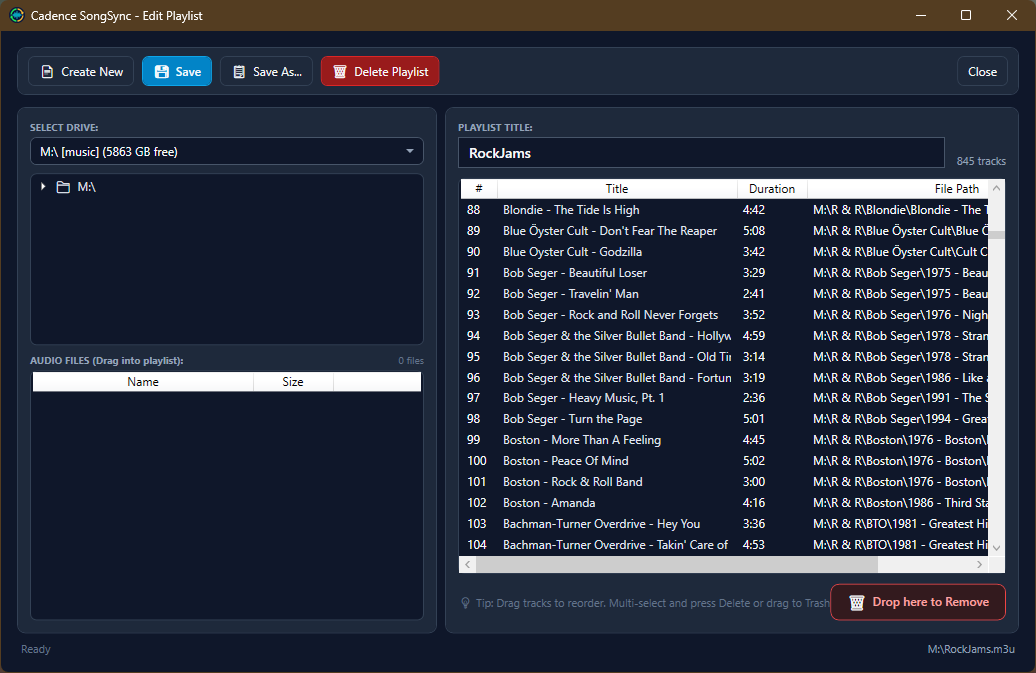
Split-Pane Playlist Editor
Hierarchical folder tree and audio file browser on the left; drag-and-drop playlist sequencer on the right with real-time missing file detection.
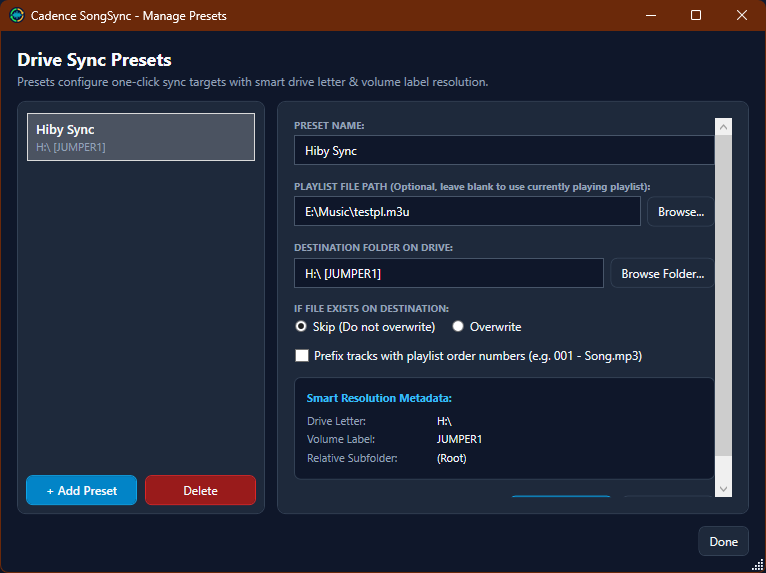
Smart Destination Presets
Configure destination drives by Volume Label. Features FAT32 filename sanitization, zero-padded numbering for car stereos, and non-blocking background progress.
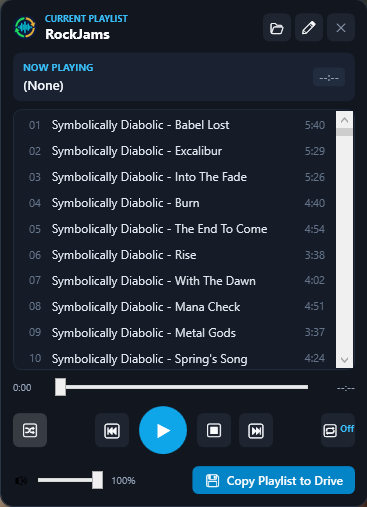
System Tray Resident Player
Left-click the system tray icon to reveal a borderless player with scrubber, true shuffle, repeat cycling, volume control, and quick playlist switching.
Why Car Stereos & USB Drives Love SongSync
Anyone who has tried syncing music to a flash drive for a car stereo knows the headaches: drive letters shift between ports, car head units scramble song playback orders without track prefixes, and illegal characters in titles break FAT32 file systems.
Cadence SongSync solves this permanently with smart volume label detection, custom folder structure options, and automatic zero-padded file prefixes (001 - Title.mp3) so your car stereo plays songs in your exact playlist sequence.
Technical Specifications
Complete transparency on platform requirements, audio capabilities, and local storage.
net8.0-windows).
System.Windows.Media.MediaPlayer hardware integration.
.m3u8 with relative and absolute path resolution.
%AppData%\CadenceSongSync\settings.json. Zero external databases or telemetry.
MIT License & Community Source
Cadence SongSync is released completely free under the liberal MIT License. You have full freedom to run, inspect, modify, and redistribute the software.
The MIT License (MIT)
Copyright © 2026 Sky Blue Eye Studios
Permission is hereby granted, free of charge, to any person obtaining a copy
of this software and associated documentation files (the "Software"), to deal
in the Software without restriction, including without limitation the rights
to use, copy, modify, merge, publish, distribute, sublicense, and/or sell
copies of the Software, and to permit persons to whom the Software is
furnished to do so, subject to the following conditions:

The above copyright notice and this permission notice shall be included in all
copies or substantial portions of the Software.

THE SOFTWARE IS PROVIDED "AS IS", WITHOUT WARRANTY OF ANY KIND, EXPRESS OR
IMPLIED, INCLUDING BUT NOT LIMITED TO THE WARRANTIES OF MERCHANTABILITY,
FITNESS FOR A PARTICULAR PURPOSE AND NONINFRINGEMENT. IN NO EVENT SHALL THE
AUTHORS OR COPYRIGHT HOLDERS BE LIABLE FOR ANY CLAIM, DAMAGES OR OTHER
LIABILITY, WHETHER IN AN ACTION OF CONTRACT, TORT OR OTHERWISE, ARISING FROM,
OUT OF OR IN CONNECTION WITH THE SOFTWARE OR THE USE OR OTHER DEALINGS IN THE
SOFTWARE.
Frequently Asked Questions
Everything you need to know about Cadence SongSync, supported formats, and car stereo syncing.
Is Cadence SongSync really 100% free and open source?
How does Smart Drive Resolution handle shifted USB drive letters?
SANDISK_32) alongside its initial drive letter. If you plug the flash drive into a different port and Windows assigns it drive F:\ instead of E:\, SongSync automatically scans your ready drives, identifies the matching volume label, and transparently resolves the path without breaking your sync workflow.
Why does SongSync prefix track numbers (e.g. 001 - Song.mp3)?
Will audio playback freeze while copying music to a slow USB flash drive?
Task.Run). Even when copying hundreds of gigabytes of lossless FLAC files to a slow USB 2.0 thumb drive, audio playback remains completely uninterrupted with zero stuttering or dropped frames.